

So, you want your website to rank in all the cities you serve, not just the one where you’re physically located. This guide breaks down how to do that effectively by publishing SEO location pages — and it’s based on real-world results.
We’ve used this exact framework to help a home care agency grow its traffic 30 times over. No blog traffic—just people searching for the services they provide. And as of now, this also works in Google’s AI mode. These aren’t theories; this is what actually works and exposing a few of the myths that are absolutely wasting your time.
Want to experience this optimized framework for yourself? Schedule a call with Sagapixel and watch your visibility grow. Our experienced SEO team will get your website in front of the customers you’re missing.
Why Location Pages Are Essential for Local SEO
One of the key pillars of SEO is to maximize the relevance of your website content to the searches people are performing. Let’s dig into two examples.
Example 1: “Dermatologists Near Me” Without Location Pages
If someone searches for “dermatologist near me” and they’re in Cherry Hill, New Jersey, the results will show local practices in Cherry Hill or nearby areas, such as Mount Laurel.
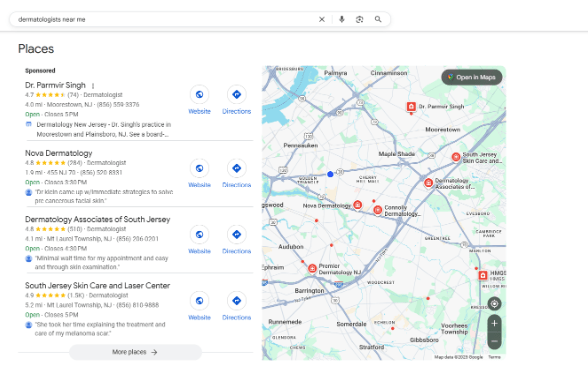
But if you’re two towns over, you won’t appear in those local map results. You can, however, show up in the organic blue link results—if you’ve got the right location pages.
When you scroll down further, you’ll see that none of the dermatologists in towns outside of the Google Maps radius are using a location-based strategy. A dermatologist in Haddonfield who could show up in these results won’t. This is definitely a missed opportunity for dermatologists in this area.
Example 2: “Home Care Near Me” With Location Pages
Now, let’s search “home care Haddonfield, New Jersey.” The number two result is Comfort Keepers, even though they’re based right here in Cherry Hill. This strategy is common among home care agencies—you’ll see Visiting Angels, Home Helpers, and franchises using it too.
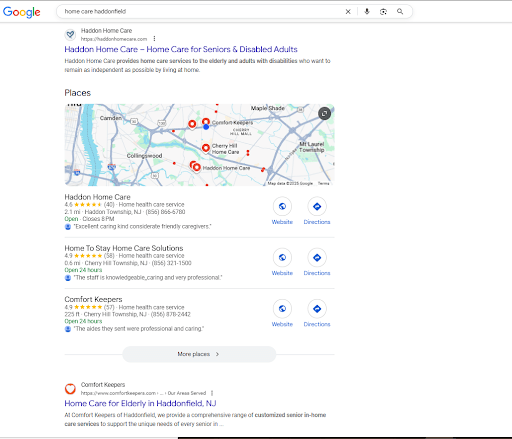
The local Right at Home franchise is also located in Cherry Hill, not Haddonfield. Similar to the home care agency that I mentioned at the beginning of this article, these searches do drive leads. In their case, they got into a hospital system with a well-optimized location page.
By building dedicated pages for each service area, home care agencies can signal to Google that they actively serve clients in those towns, even if their physical office isn’t located there. This allows them to compete for “near me” and city-based searches across multiple nearby markets.
How to Build High-Performing SEO Location Pages
So, what do you need to do to get these pages driving traffic to your website? Follow the steps below.
1. Internal Linking
Each location page should link to every other location page. We usually do this with a module in WordPress or Elementor, so it updates automatically. Comfort Keepers does this, and they rank really well because of it.
2. On-Page SEO Basics
Here is your basic checklist for SEO work on these location pages:
- Title Tag: Include your target keyword, a separator, and a value proposition.
- Example: “Home Care Cherry Hill | 35+ Five-Star Reviews”
- H1 Tag: Should contain your target keyword.
- Tagline: You can also add a <p> tag after that with a tagline of some kind, and then add a sentence or two about your business below that.
- Call-to-Action Buttons: Include two right after the intro: one that asks customers to contact you and another that leads them to more information.
3. Content Comprehensiveness
Cover the logical next questions customers will have. Use “People Also Ask” and check what top-ranking competitors are including.
- Include subtopics that answer your customer’s follow-up questions.
- Use the People Also Ask feature on Google for ideas.
- Analyze top-ranking competitors in your market.
But don’t just crank out 2,000 words of fluff—that can hurt more than it helps. Keep it focused and useful. I also like to run a natural language processing analysis to check semantic density—basically, how much real value the content provides compared to competitors.
4. Get Your Structured Data Right: “Area Served” Schema
There is “areaServed” structured data that you can add to all of these pages. Sometimes, you’ll see cases like this, where all I did was add “areaServed” data to the page in our schema, and we went from position 12 to position 4 virtually overnight.

I did this on a Saturday and by the end of the day Sunday, it was already there.
5. Don’t Waste Time Embedding Maps
So, what about Google Maps embedding?
This is a myth.
It did have an impact 10 years ago or so, but at this point, all it does is slow down the load time for your pages. Now it has to ping Google’s systems to send over the map, and Google has no reason to rank you better just for embedding a map.
Don’t waste your time.
Layout of a High-Converting SEO Location Page
Here’s the format you should follow to create a high-converting location page:
✅ Hero Section
- Grabs attention with a clear value prop
- Includes a strong CTA (call-to-action)
✅ Social Proof Section
- Why should anyone trust you?
- Examples: reviews, logos, partnerships
✅ Services Overview
- Highlight the services you offer
- Detail how they solve the user’s problem
✅ Overcoming Objections
- Address common concerns
- FAQ format works, but conversational content works too
✅ Alternative Sales Pitch
- For visitors not ready to convert
- Offer something like a downloadable guide or link to your Instagram
Want to know more? Download our full guide to SEO location pages.
Final Thoughts on SEO Location Pages
SEO location pages aren’t just about content — they’re about strategy. From smart internal linking to schema markup and conversion-driven design, each piece plays a role in helping your business rank in multiple cities and capture high-quality leads.
Want a copy of this full template? Download our Guide on How to Design Web Pages that Convert.
