

Launching a new website is exciting, but figuring out how to get it ranking in Google can feel overwhelming. Where do you even start? Which steps actually matter, and which are irrelevant?
Over the past 15 years, I’ve worked on hundreds (possibly thousands) of websites, helping them grow from zero traffic to thousands of monthly visitors. One site we launched in September 2021 is now pulling in well over 100,000 organic visits a month, proof that the right approach works, even from scratch.
In this guide, I’ll share the exact steps we use at Sagapixel to get results for new websites, so you can set yours up for long-term SEO success.
Want to grow your website traffic with SEO that actually works? Schedule a call with Sagapixel today. We’ll help you build a strong foundation, attract the right visitors, and create a strategy that supports your long-term growth.
Understanding The 3 Main Parts of SEO
There are three main parts to SEO:
1. Technical SEO
Basically, this means you’re structuring your website in a way that Google will be able to optimally crawl, index, and understand all of your content. This is the part that is most critical to do well on a brand new website, and it’s the area where I’m going to give you a lot of pointers.
2. On-page SEO
On-page SEO aims to maximize the relevance of the content on your website to the searches your target customers are performing. That could be when they’re explicitly looking for the thing that you do—like “medical weight loss near me”—or when they’re researching the problems that you solve, like “how to lose 15 pounds in 2 months.”
3. Off-page SEO
Off-page SEO aims to maximize the trustworthiness and authoritativeness of your website. Basically, you want Google to know that it can trust you. Are you an expert? Do other pages on the internet mention you? Do they link back to you? Have really trusted websites like The New York Times ever include a backlink to a piece of content that you wrote?
Technical SEO: Get the Foundation Right
Let’s start with the technical SEO you need to get right with your brand new website:
1. Use an SEO Tool to Run a Crawl
To start, you should get some sort of SEO too like Ahrefs or SEMrush and run a crawl.
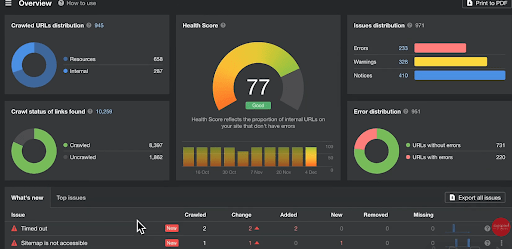
The goal here is not to make all of this green. A lot of the time, you’ll find that there are non-issues that appear in these reports, but you really need to keep an eye out for serious problems that could potentially prevent your website from getting crawled and indexed by Google.
Look for:
- Pages blocked from indexing
- Broken internal links
- Missing title tags or H1s
- Incorrect redirects
There are plenty of tutorials on YouTube for how to run and read these reports.
2. Make Sure Your HTML Structure Makes Sense
Take a look at the HTML structure of your page.
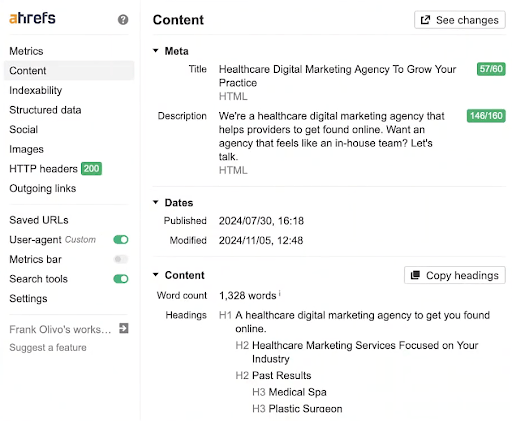
You want to make sure that you have a heading structure that makes sense, and includes the keywords that you want the website to rank for, as well as semantically related keywords. For example, we’re trying to get one of our pages ranking for “healthcare digital marketing agency,” so we include:
- Keywords like “healthcare providers”
- Industry-specific H2s that add relevance
- Structured content that helps Google understand the topic
You want to make sure you’ve included the proper structured data about your organization. Tell Google who your company is, link over to different social media accounts so they can get an idea of your footprint on the web, and provide information about your logo.
Basically, provide any information that’s going to help Google understand who this website actually belongs to and how all of these other profiles are connected.
3. Set Up Internal Linking
As you structure your website, make sure that you’ve set up proper internal linking over to all the pages that you want to rank in organic search.
Let’s look at an example from Cypress HomeCare Solutions in Scottsdale, Arizona.
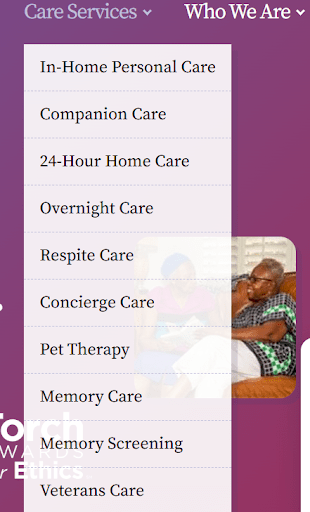
They want their website to rank for services like:
- 24-hour care
- Overnight care
- Memory care
- Veterans care
Make sure these service pages are linked in the navigation and within the body of the homepage.
Any backlinks that your website earns will pass some of that link equity (backlink trust) over to the pages that you’ve linked to from that page (from the homepage, in this case, or other pages on the website).
That means as you are earning links to the homepage, you can pass that value over to these other pages that you want ranking, like the 24-hour care page.
On-Page SEO: Maximize Content Relevance to What Users Are Searching
1. Conduct Keyword Research
To start off, you’ll need to do keyword research. This will help you find out exactly how people search for the things that you do.
For example, in the case of a home care agency, people may be searching for “senior care,” “in-home care for the elderly,” or “home health aides” instead of just “home care.”
Keyword research helps you uncover all the different ways people look for what you do, and usually leads you to identify long-tail keywords.
In the case of Sagapixel, ranking for a keyword like “healthcare digital marketing agency” is often more competitive than ranking for something like “marketing agency for medical weight loss” or “marketing agency for hair transplant.”
Doing keyword research will help you to uncover keywords like “dentists in New Jersey that accept Blue Cross Blue Shield insurance.”
These long-tail keywords often can be very easy to rank for.
2. Map Keywords to Pages and Optimize
Once you’ve done your keyword research and you’ve pulled together your list, you need to:
- Map all those keywords to different pages on your website
- Optimize each one of these pages for the keywords that you’ve mapped to them
Let’s say you identified a keyword like “dentist Cherry Hill New Jersey,” and you accept Blue Cross Blue Shield.
You’ve mapped both of those keywords to your “Cherry Hill dentist” page.
You now need to:
- Include your keyword “dentist Cherry Hill New Jersey” in your title tag
- Include it in your H1 tag

It doesn’t matter if you include it in your meta description. It’s not going to impact it.
You need to include your keyword in all of your H tags.
In the case of our example, they made a massive mistake, because they only have an H1, and there are no other headings on this page. This is definitely bad on-page SEO.
As you can see, though, it’s not a super competitive market, and I was able to find this practice pretty quickly.
I would venture to say that anyone in Cherry Hill could probably do minimal on-page SEO and outrank this website fairly easily.
3. Add Internal Links to New Pages
So, you’ve written and optimized your content, and now you need to add some internal links over to your new page.
Once you’ve identified all the pages that you want to get ranking, you need to find all the instances on the website where you’ve used some semantically related language, or where you can add some language, and link over to this page with those keywords.
In the case of Cypress HomeCare Solutions, I want to see where we could possibly add some internal links from other pages on the website over to the “24-hour Care In Scottsdale” page.
There are plugins you can install in WordPress, and Surfer SEO can help you with this.
If you don’t have access to any of those tools, even a simple Google search can help you accomplish this.
Search the following on Google:
site:cypresshomecare.com “24-hour care”
This will show me all of the pages on this website that have this mentioned.
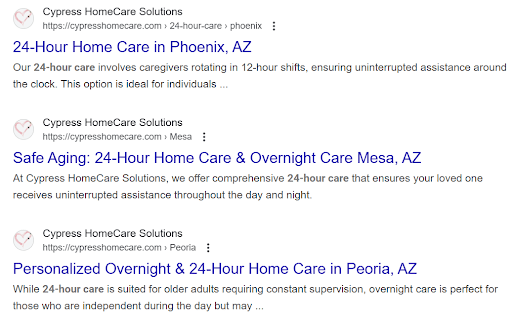
I can go to one of these pages, and add an internal link over to that 24-hour page.

Basically, rinse and repeat.
Honestly, there are going to be lots of opportunities for internal links on this website, and on the website that you just built.
Off-Page SEO: Link Building
1. Guest Posts: Use with Caution
The first thing you’re going to hear about is guest posts.
If you go to a marketplace and purchase guest posts, at best they’re not going to move the needle.
In 2023 and 2024, Google rolled out some new algorithms, and I saw this reflected. They’re getting really good at spotting these websites that are selling backlinks, and basically neutralizing their effect.
If you’re going to do link building through guest posts, make sure that you’re actually reaching out to these websites.
If you can just go to a marketplace and purchase backlinks, they’re probably going to have little to no effect on your search performance.
That’s just what I’ve seen.
2. Local Citations and Trusted Directories
I have seen the needle move when a website got listed on directories that Google trusts.
Don’t go on Fiverr and buy a gig where they list your website on 500 websites. It’s probably a waste of time and money.
However,
- Having a Yelp page
- If you’re a plastic surgeon, being listed on RealSelf
- If you’re a local radiologist, being on Healthgrades
I’ve seen those listings get opened up and websites start to rank better.
As a matter of fact, last year we were listed on Semrush’s agency directory.

They ranked us as one of the top healthcare digital marketing agencies, and I saw us start ranking for these keywords almost overnight.
You need to find out what the equivalent to that is for you and your market.
3. Sponsorships and Local Organizations
If you sponsor any local organizations, like:
- A Little League
- A JCC
- Any place that has a website and a relationship with you
Reach out to see what opportunities there would be for them to add a link over to your website. Some just have a “Our Sponsors” logo section. You may even already be there. You need the backlink.
4. Set Up Google Search Console
Lastly, you need to set up Google Search Console.
Here’s what you’ll do:
Go to Sitemaps.
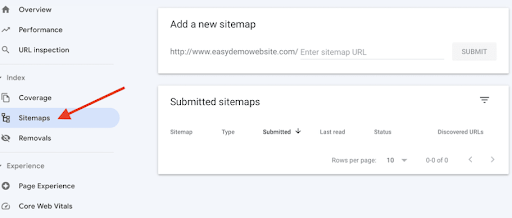
Submit your sitemap to Google.
Then go over to Pages.
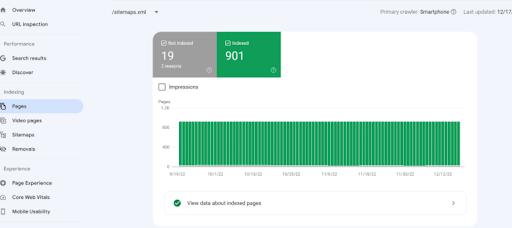
Once they’ve crawled it, check to make sure that Google is indexing the pages on your website.
If there are any pages that are:
- Crawled–currently not indexed
- Excluded by noindex tag
- Discovered–not indexed
- Duplicate
Or anything like that, you’ll now know and be able to address it.
Grow Your Website with SEO Services from Sagapixel
At Sagapixel, we’ve worked on hundreds of new websites, helping clients from many different industries build solid SEO foundations that lead to long-term traffic growth.
We’ll handle your technical setup, internal linking, content optimization, keyword research, and help you earn legitimate backlinks that move the needle.
Schedule a call with us today. Let’s build your site the right way, with SEO that works from day one.


